
Pitch venues for your next shows
A list of venues that fit your size and sound in the cities you choose, a pitch to each one that you read and approve, and every reply logged in one place.
What this gets you
Booking emails that sound like you, sent to rooms you can actually fill. Your manager finds venues in the cities you name, drafts a pitch for each, and sends only the ones you approve. Replies come straight to your own inbox.
When to use it
Use it two to four months before the dates you want, once you have a press kit and a realistic number for how many people you bring. It works best for bars, clubs, small theaters and similar rooms. It is not a ticketing tool, and it does not route a tour for you.
Do it
- Open Venue Booking (Cmd+K, type "venue"). On the Campaigns tab click Start a Campaign, or New Campaign if you already have one.
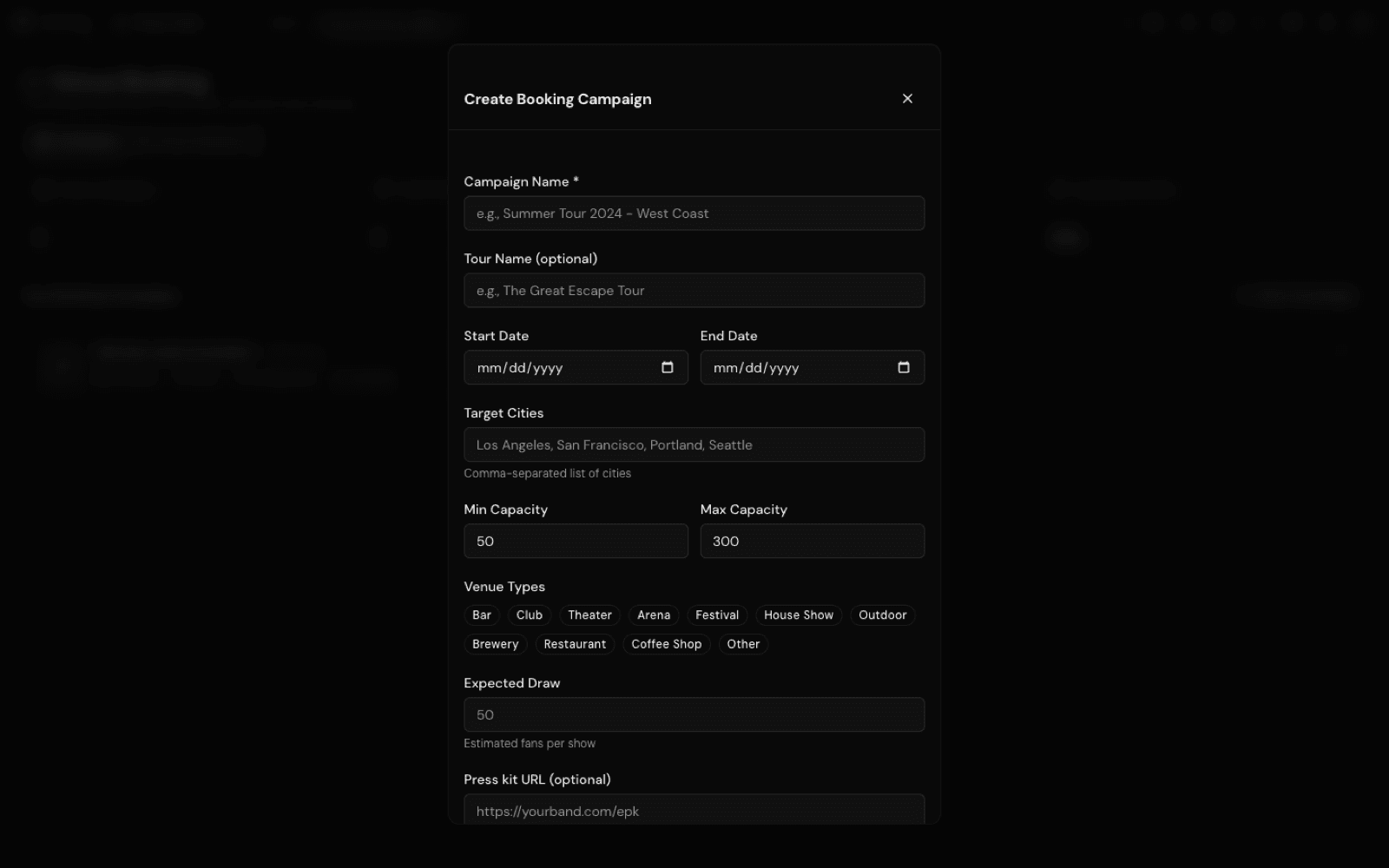
- In Create Booking Campaign, give it a Campaign Name, the Start Date and End Date you are free, and the Target Cities separated by commas. Set Min Capacity and Max Capacity, tick the Venue Types that fit, and put an honest number in Expected Draw. Paste your press kit link into EPK URL (optional) and click Create Campaign.
- Open the campaign and click Start Research. Musuni looks for venues in those cities that match your capacity and venue types and have a way to reach the booker.
- Click Run Qualification. Venues that fit go forward; venues with no booking email drop out. If the Missing Venue Emails card appears, Find Missing Emails tries to find more.
- Click Generate Pitches. Your manager drafts one pitch per venue from your real details, and they land in the Pitch Review Queue.
- Read every pitch. Click Preview to see it in full, Edit to change the subject or body, then Save & Approve or Approve. Approve All is there, but read them first: each one goes out under your name.
- Click Send Pitches. Venues get the email from your artist name via Musuni, and when they hit reply it goes to the email on your Musuni account. Venues that do not answer get up to two short follow-ups, about 7 and 14 days later.
- When a venue writes back, open their pitch and click Record Response: Interested, Hold Available, Needs More Info, Not Available, Declined or No Response. Add a note, for example "Offered Mar 14, door deal, confirm by Friday", and click Save Response. When the show is confirmed, click Mark as booked, fill Show date, Venue and Fee (optional), keep Add it to my calendar and shows ticked and click Save booking.
Let Manny do it
Type "Find venues for 100 to 300 cap shows in Austin and Dallas in March and draft pitches" and Manny creates the campaign, runs the research and drafts the pitches. "Show me the pitches waiting for review" lists them, and you can approve with edits in chat. Manny only sends after you say so in plain words, such as "yes, send them". "The venue in Dallas replied, they want more info" logs the response.
What it cannot do
- Replies arrive in your own inbox, not in Musuni. You log each response with Record Response; nothing reads your email for you.
- The emails come from your artist name via Musuni, not from your personal address. Replies still go to you.
- City names must match exactly. One city per entry, spelled the usual way; regions and whole countries are not supported.
- Not every venue lists a booking email, so some good rooms drop out at qualification.
- Plans: Free includes 1 campaign a month, Creator 3, Pro 10, Studio unlimited. Finding missing emails also has a monthly allowance per plan.
- It is in beta. Venue Booking may be hidden in your menu until it is unlocked for you; ask Manny to open it.