
Get honest feedback on a song
A read on a song before you release it: what works, what to fix, who it is for, and where to push it, without asking your friends.
What this gets you
Before you spend a month promoting a song, you know whether the master sits at a sensible level, how much dynamic range it has, the tempo and key, songs that share its shape, and two or three next moves. This is a read on the mix, not a prediction that the song will be a hit. After release, the same screen can show how the song is doing across platforms.
When to use it
When you have a finished or near-finished master and are choosing what to release next, or deciding between two mixes. Also when a song is not landing and you want a second opinion that is not your producer's.
Do not run it on a rough demo and expect release advice. The read is only as good as the audio you give it.
Your music is never training data
Your audio stays on Musuni's own servers. It is not handed to an outside AI service, and it is never used to train an AI model, ours or anyone else's. What reaches a language model is text: the title, the genre you typed and the measurements taken from the file.
Do it
- Open Song Analysis (Cmd+K, type "song"). The screen reads "Is this ready to put out?".
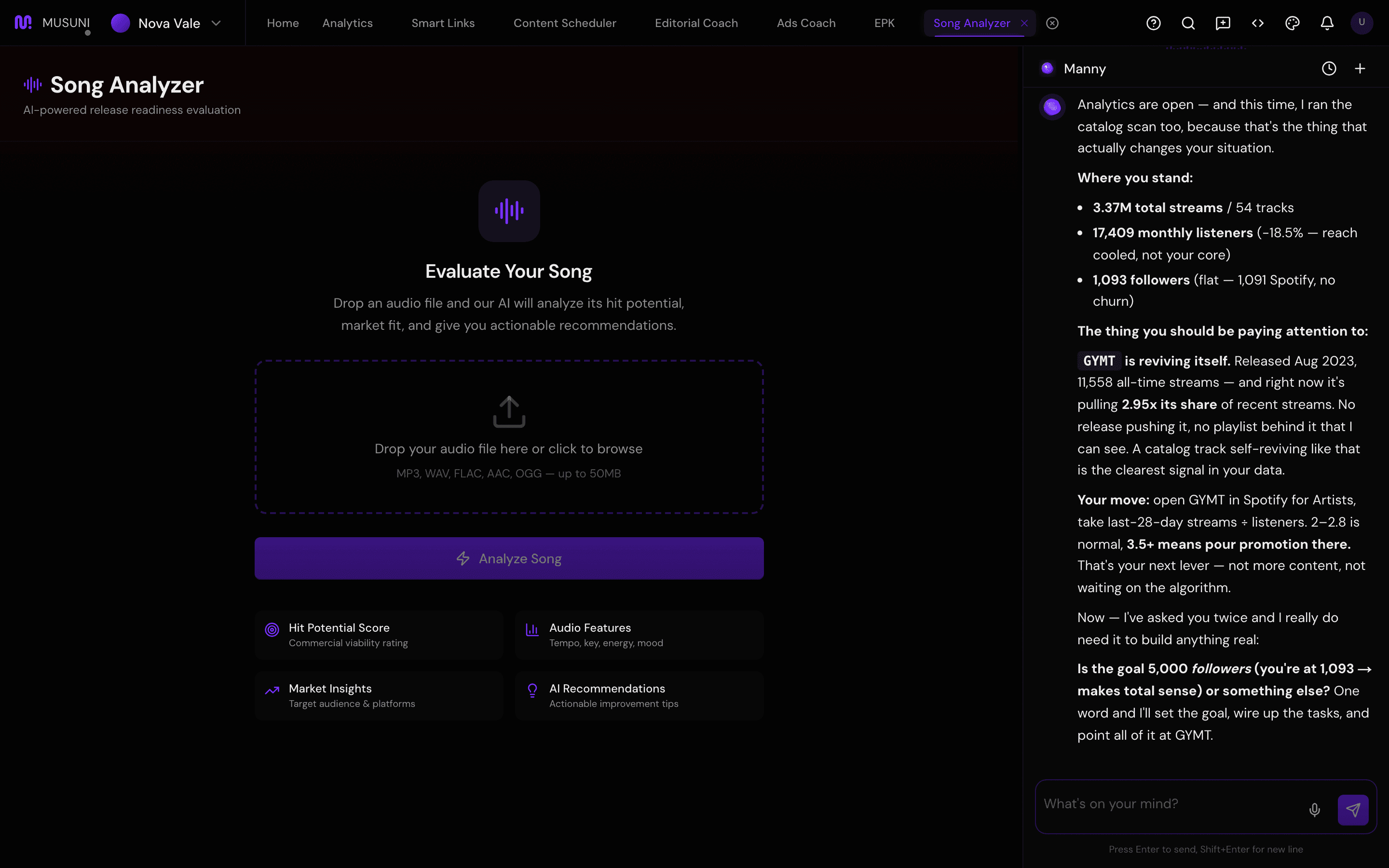
- Drop your audio file on "Drop your audio file here or click to browse". MP3, WAV, FLAC, AAC or OGG, up to 50MB. WAV or FLAC gives the best read.
- Fill Song Title, Artist, and Genre if you want. The words is optional: paste the lyric sheet with the mix if you have it, and the clip line and notes get more accurate because they use the words you wrote. Skip it and you still get the mix read and a clip clock. The file stays on Musuni and is never sent out to guess lyrics.
- Click Analyze Song. Four stages run in order: Audio Processing, Shape Match, Mix & Fit, Manager notes. Expect one to two minutes. Stay on the screen or come back; the result is saved either way.
- Read the report from the top. Release-ready (the master) is mix readiness from level and dynamics, with the tempo, key, level and dynamics numbers under it. If those numbers did not come through, it says it does not know yet. Where to clip gives a stretch to film (for example 1:53–2:00) from the structure map, not a viral prediction; click Hear 1:53–2:00 to play just that part. On this mix shows where the part that comes back sits on the song's timeline. You vs you compares this mix to your last analyses (on your first mix it says it does not know yet). Manager notes and What to do next turn all of it into a few moves: the mix, the clip, and what to do in Musuni. If you pasted a sheet, the notes name the line you already repeat. After a second mix, Your mixes that share a shape ranks them. There is no streaming or radio score and no chart list on this screen.
- Plan a clip around this opens the scheduler with a performance caption and the timestamp. Face the camera, no CTA in the video.
- If the song is already out, open Post-Release Performance at the bottom, paste the song's ISRC (your distributor shows it, it looks like "GBKQU2166610") and click the button. You get live streaming stats across platforms. The pre-release mix/hook labels stay on screen so you can see what we called next to what happened. We won’t pretend the mix predicted the streams.
- Click Download PDF to keep the report or send it to your producer. Take one recommendation back to the session, not five. Re-run on the new bounce and compare.
Let Manny do it
"Open song analysis" opens the workspace. The upload itself happens in the workspace, not in the chat. Once the report exists, go back to the chat and ask "What did my song analysis say?" or "How can I improve my production?"; Manny reads the saved report and turns it into a plan.
What it cannot do
- Musuni does not train models on your music, and the analysis is not shared with other artists or sold on.
- It is an opinion from a model, not a label A&R. A high mix score does not make a hit and a low one does not make a bad song. Use it to catch things you are too close to hear.
- Analyses are limited per month: 2 on Free, 10 on Creator, 50 on Pro, unlimited on Studio. Usage shows under Settings, Billing & Plan.
- Sentiment comes from YouTube and SoundCloud comments only. Spotify does not expose listener comments, so a Spotify-only song has no sentiment read.
- Post-Release Performance needs an ISRC. Unreleased songs have none.
- It does not compare two files side by side. Run each and compare the reports yourself.
- It does not transcribe the mix. There is no Whisper pass on your file. Lyrics are optional; paste the sheet with the mix if you want a more accurate clip line.
- Files over 50MB are rejected. Bounce a shorter or compressed version.